BETA · TAKING ON NEW PRACTICES

Your patients book their own appointments.
The calendar stays yours.

The online booking platform from Komvos Ygeias, for medical and dental practices, diagnostic centres and therapists. Patients can only book inside the hours you define, free while the beta lasts.

Free for the duration of the beta. No card required.

A product of Komvos Ygeias.

Komvos Ygeias is a team of health professionals in Ioannina. Komvos Connect grew out of our own need to schedule visits precisely.

Ways you can run it

The phone is not always available.
The calendar can be.

There are hours when a practice cannot answer: when it is closed, when the line is busy, when everyone is in with a patient.

The platform works in those hours and writes the appointments where you already look at your schedule.

Three things that always hold

It takes requests outside opening hours, within your rules.

Each practitioner has their own hours and their own leave.

Every appointment is written once, by the patient or your front desk.

How one appointment works.

From the moment a patient books it to the moment it lands in your calendar.

  1. 1

    The patient books

    Widget on your site

    One script tag. They book without leaving your page, in your practice colours.

    Or a hosted page

    No website? You get your own page for Google, Instagram or SMS.

  2. 2

    It lands in your schedule

    Google and Outlook

    Written into each practitioner calendar. Sync is one way: we write, we do not read, so a personal event of yours does not block a slot here.

    Admin dashboard

    Day, week and month views colour-coded per practitioner. Phone bookings and a patient list.

  3. 3

    It runs itself

    Confirmation and reminder

    An email with the booking and a reminder before the appointment, under your name.

    Reschedule and cancel

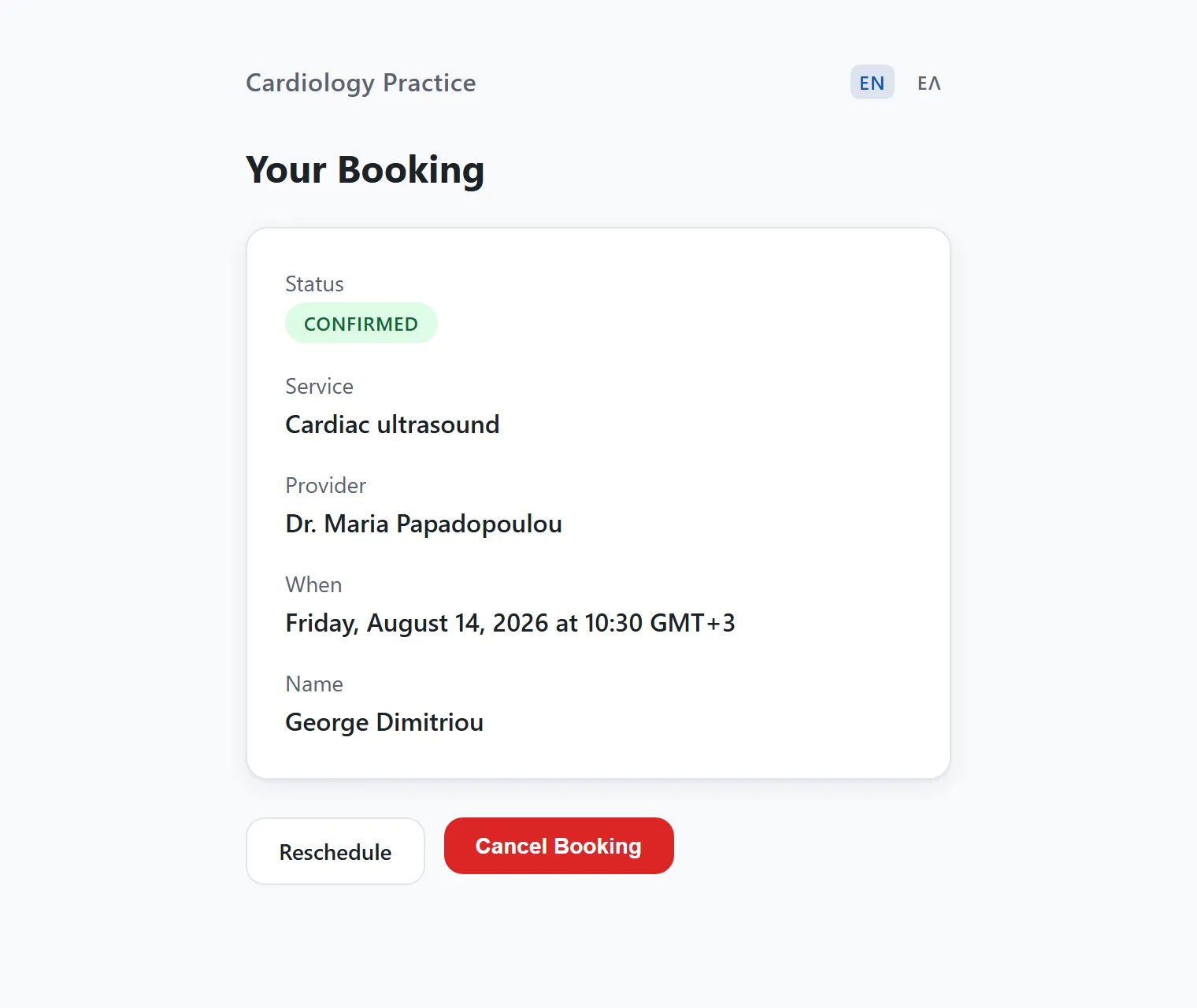
    Patients handle it themselves from a link. The slot frees up immediately.
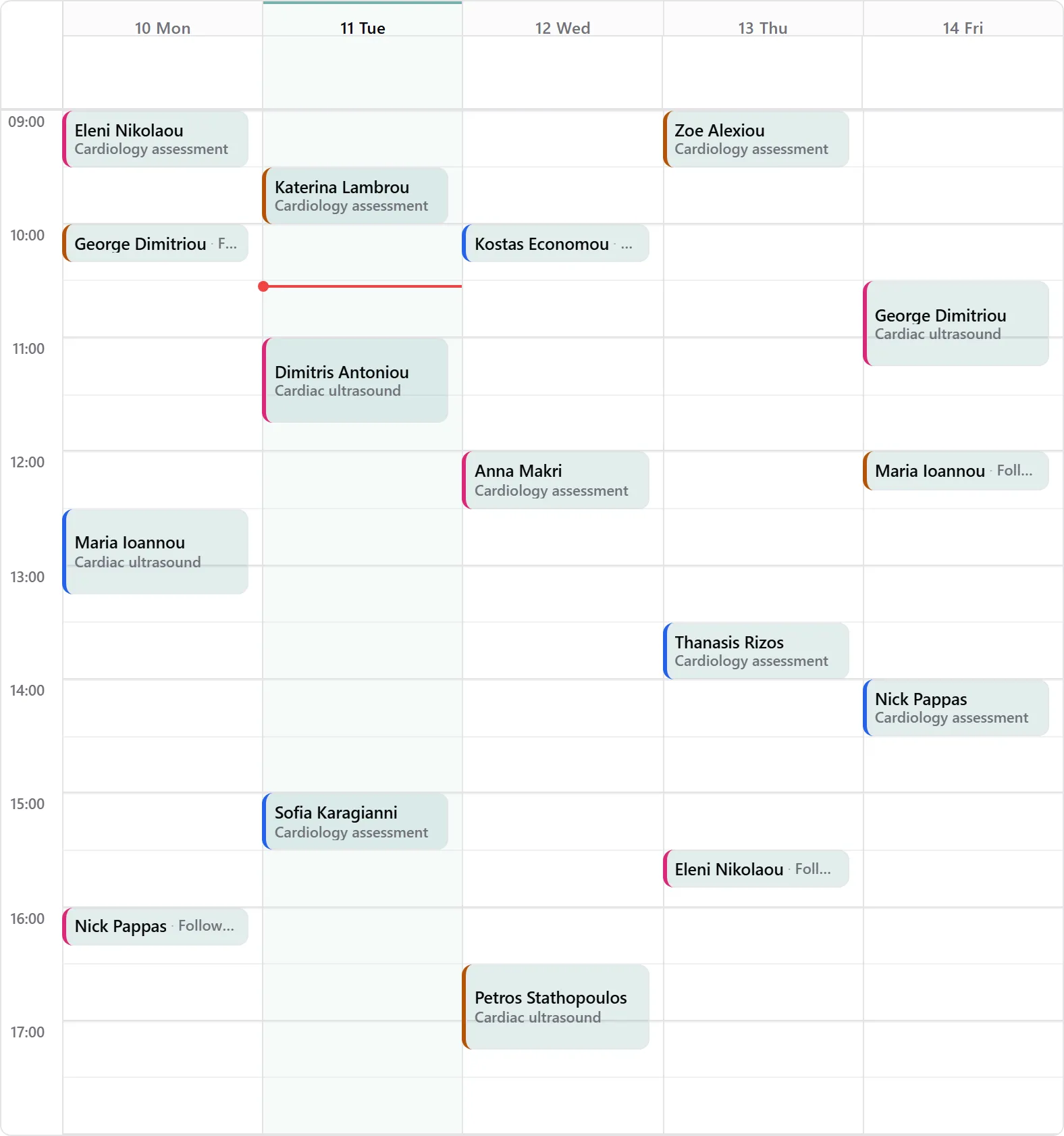
Many practitioners, one schedule: each with their own hours, leave and services. Two bookings never land on the same slot.

THE DEMO IS LIVE

See the flow the way your patient sees it.

Below is the same booking form that gets embedded in a practice's website, running here on a demonstration account.

Pick a shade to see how the form takes on the practice's colour. In your own account you set your own.

Practice colour
Demonstration account
The form inside a website
The real form, not a screenshot.

What we need from you, what we take on.

You do not need to be technical or to change your website. We do the setting up.

01

Request

You fill in a short form and someone from our team replies. If it fits, we arrange a conversation.

Practice details
How many practitioners take appointments
What you want to solve first
02

Setup

We configure the services, the hours per practitioner and the connection to their calendars, usually in two to three working days.

Hours and leave
Services with durations
Your logo and colour
Email from your own address
03

Going live

We put the form on your website or give you the hosted booking page, and we train your team on the admin panel.

Embedded in your website
Hosted booking page
A link for your social profiles
Training for your team

What the beta includes.

There are no tiers and no add-ons. While the beta lasts, everything below applies with no caps.

For your patients

  • Booking from your website
  • A choice of service, practitioner, day and time
  • A confirmation email with a calendar file
  • A reminder before the visit
  • Rescheduling or cancelling from a personal link
  • In Greek and in English

For the practice

  • A calendar in day, week and month views
  • Hours and leave per practitioner
  • Preparation time before and after
  • Appointment entry by your front desk
  • A patient list with their history
  • Reports per practitioner and month
  • CSV export of appointments

For your identity

  • Embedding in any website
  • A hosted booking page
  • Your logo and practice colour
  • Email from your own address, if you give us the credentials
  • Setup, training and support
DESIGNED FOR
Medical practicesDental practicesDiagnostic centresPhysiotherapySpeech therapyDietitiansPsychotherapy

It is also used by hair salons and personal trainers.

What it costs now and what it will cost later.

While the platform is in beta, use is free and setup, training and support are included. There is no trial clock and no card required. When pricing is set we will announce it with advance notice, and there will be no per-booking fee.

Request access

Questions practices ask us

Usually two to three working days from the moment we have your hours and your service list. We take on the technical side.
It goes into any website that lets you add one line of code: WordPress, Wix, Shopify or a site built from scratch. Otherwise we give you a hosted booking page. Your own domain is not supported today.
Each practitioner connects their own calendar and every appointment is written there automatically. The flow runs one way: the platform writes to your calendar, it does not read it. A personal event in Google does not hold an hour on the platform, which is why leave and holidays are declared in the admin panel.
There is no cap on practitioners or on appointments. Each has their own hours, services and leave, and the patient can pick a person or whoever is available.
Yes, per practitioner from the admin panel: standing weekly hours, leave and holidays as closed date ranges, one-off open Saturdays as exceptions, and closed periods inside a day.
Both the booking form and the admin panel run in the browser, with no app to install.
We will announce pricing with advance notice before it takes effect, and there will be no per-booking fee. If it does not suit you, you export your data and you stop.
Your practice does. You can export appointments to CSV whenever you want, and the full dataset on request. We do not sell data and we do not share it with third parties.
We are not selling you a certification, we are describing what is there: export and erasure of a patient's data on request, anonymisation where the history has to remain, automatic purging of old appointments, an audit trail of what your users did, and privacy policy templates.
No. Confirmations and reminders go out by email. We do not send SMS confirmations or cancellations.

Tell us about your practice.

Request access See how you start No card needed. Someone from our team will reply, usually within one working day.